

A candidate hands HR an attested degree certificate. A university receives a marriage certificate with a UAE attestation. A professional body is sent a notarised power of attorney. Each asks the same question: is this attestation real, and how do we check it?
The short answer is to check the attestation with the authority that applied it, through that authority's own official channel. For a Ministry of Foreign Affairs (MoFA) digital attestation, that channel is MOFA Verify at verify.mofa.gov.ae, where the "Document Status" option asks for the "Attestation Number" and the "Attested Date". Documents attested by the Ministry of Justice, notarised at Dubai Courts, or issued digitally by a government entity have their own checks, set out below. Where attestation fits in the wider process is covered in the complete guide to UAE document attestation.
This article describes published requirements and is not legal advice. The authority that issued or attested a document decides whether it is genuine, so ask it directly when something does not match.
What an attestation certifies, in MoFA's words
Start with what you are checking. MoFA's "Attestation of Official Documents and Certificates" page, read on 20 September 2026, states: "Attestation certifies the authenticity of the signatures and seals on documents issued within or outside the United Arab Emirates."
The wording refers to signatures and seals. If your question concerns the content, such as whether a degree was awarded, ask the issuing body as well.
The same MoFA page describes Digital Attestation as "an electronic service provided by the Ministry of Foreign Affairs for UAE-issued digital documents intended for use outside the United Arab Emirates." Answering the question "Is Digital Attestation the same as an electronic version of a paper attestation stamp?", it states: "No. Digital Attestation is an official attestation that is electronically applied to the document. The attestation appears on the last page and includes the attestation reference number, attestation date, amount paid, and a verification element."
Those two details, the reference number and the date, are what MOFA Verify asks for.
Step one: identify whose mark is on the document
Note which authority attested, notarised or issued the document, because the official check depends on it. The table lists the routes we found on official pages on 20 September 2026.
| What the document carries | Official check | What the page asks for | Source page |
|---|---|---|---|
| MoFA digital attestation | MOFA Verify, verify.mofa.gov.ae, "Document Status" | "Attestation Number" and "Attested Date" | MOFA Verify portal; MoFA attestation page |
| Digital attestation by a UAE embassy (London, Islamabad, New Delhi pages reviewed) | MOFA Verify, verify.mofa.gov.ae | "Attestation Reference Number" and "Issued Date" | Each embassy's Digital Attestation page |
| Ministry of Justice e-attestation | MoJ "Attested File Verification" | "Label No" and a captcha | MoJ verification portal |
| Ministry of Justice e-notary document | MoJ E-Notary "search and verification" link | Field labels not confirmed | MoJ E-Notary System page |
| Dubai Courts notarised document | Dubai Courts "Certificates inquiry" | Fields shown: "Name", "Emirates ID Number", "Company", "License Number"; register, "Year", "Document Number :" (which are required not confirmed) | Dubai Courts Certificate Inquiry page |
| Digital Trusted Document issued by a government entity | UAE Verify | Upload the document, or scan its QR code with the UAE PASS app | TDRA UAE Verify page |
| Document signed through UAE PASS | UAE PASS "Verify Signature" | Upload the signed document | TDRA UAE PASS page |
| Higher education equivalency decision | MoHESR "Document Verfication" page | "Equivalency No." and "Verfication No" | MoHESR e-services page |
| Dubai Health Authority service output | DHA Sheryan "Verify Documents" | "Barcode Number" and "PIN Number" | DHA Sheryan page |
Courts in other emirates, apart from the Abu Dhabi Judicial Department page noted below, and other issuing bodies were not reviewed. If the mark belongs to an authority not listed, ask that authority how it verifies its documents.
MoFA also describes what it expects from documents sent for digital attestation. Its attestation page says documents must "Include a verification mechanism, such as a QR code, barcode, electronic link, or reference number." It adds that such a mechanism "may include a QR code, barcode, electronic link, document reference number, or any other electronic verification method provided by the issuing authority." So check whether the underlying document carries its own check from the body that issued it.
Checking a MoFA digital attestation on MOFA Verify
The MOFA Verify portal was read in a browser on 20 September 2026. Its landing text states: "MOFA VERIFY is a digital platform that enables instant verification of your "Digital Trusted Document". It verifies the authenticity, integrity and validity of the document from the official source."
The portal showed three buttons: "Document Status", "Verify Document" and "Application Status". The steps below follow that reading.
- Open verify.mofa.gov.ae. MoFA's attestation page lists it as "Digital Document Verification: Official source ↗;.
- Select "Document Status". A dialog titled "Document Verification" opens.
- Enter the "Attestation Number". The placeholder showed a format beginning "AEDA".
- Enter the "Attested Date" using the date selector.
- Complete the image-selection check, then select "Submit".
- Compare what the portal returns with the document in front of you.
In the same reading, "Verify Document" opened no dialog, so we cannot describe that option. We did not find a fee for MOFA Verify on the pages reviewed on 20 September 2026.
MoFA's own attestation page uses slightly different labels. Its answer to "What should I do if I am unable to download the completed document?" reads: "Ensure you have received the completion email, access MOFA Verify (Official source ↗ select Document Status, and enter the reference number and issue date. If the issue persists, contact Customer Service with the application reference number." The portal says "Attestation Number" and "Attested Date"; the page says "reference number and issue date". Take both from the attestation printed on the document's last page.
Attestations applied by UAE embassies
Three UAE embassy pages reviewed on 20 September 2026 point to the same portal for their digital attestations. The UAE Embassy in London states: "Enter the Attestation Reference Number and the Issued Date to confirm the document's authenticity." The Islamabad and New Delhi pages say the same numbers are entered "to confirm the document's validity."
If the difference between "authenticity" and "validity" matters for your decision, ask MoFA what a result confirms.
Paper and courier-based attestations
We did not find a MoFA route for checking a paper or courier-based attestation on the MoFA pages reviewed on 20 September 2026 (the attestation page, the FAQ page and the digital attestation document list). To confirm a paper attestation, contact MoFA using the channels listed below.
UAE Verify and UAE PASS: a separate route
UAE Verify is a different service from MOFA Verify, and the two should not be treated as one.
The u.ae page on UAE Verify, updated 30 December 2024, states: "'UAE Verify' is a digital platform that helps government and private entities, and individuals to verify the authenticity of digital documents issued by one of the entities or partners of 'UAE Verify'." It adds: "Verification can be done instantly without the need to review the content of the document, or examining the original hard copy or its true copy."
The Telecommunications and Digital Government Regulatory Authority (TDRA) describes the check for a recipient: "Individuals receiving a Digital Trusted Document can verify its authenticity, integrity and validity directly from the official UAE Verify Platform by uploading the document. Additionally, recipients have the option to verify the Digital Trusted Document by scanning its QR code using the UAE PASS app." TDRA names the portal as uaeverify.gov.ae.
On what the check confirms, TDRA's page states: "UAE VERIFY platform will check the Digital Trusted Document hash registered on the Blockchain and verify that the document comes from the official source and has not been tampered with."
MoFA's FAQ on certificates from other government authorities
MoFA's FAQ page asks: "How can I verify the validity of the digitally attested certificates issued by different government authorities in the UAE?" Its answer points readers to UAE PASS to upload the document and verify its validity. The exact wording of that answer differed between our readings on 20 September 2026, so look for the verification option on UAE PASS rather than a fixed label.
MoFA also has a "Document Verification Service" page at mofa.gov.ae/en/uaepassdocverification. On 20 September 2026 it showed "Upload File", "Supported File Types: PDF" and the statuses "Verified", "Not Verified" and "Document to be verified". The page did not describe which documents it covers, so confirm its scope with MoFA before relying on it.
Verifying a UAE PASS signature
A document signed through UAE PASS can be checked for its signature. TDRA's UAE PASS page states: "UAE Pass enables signature verification. Open the app and tap 'Verify Signature', upload the document to verify." The u.ae UAE PASS page says: "if someone shares a signed document with you, you can instantly verify it on the app or even on the UAE Pass website." The UAE PASS developer FAQ names a third channel: "the Self Care portal and select the Sign & Verify tab." The three pages name the channels differently, so use the one your UAE PASS account shows. How businesses use UAE PASS more widely is covered in the guide to UAE PASS for business.
Ministry of Justice attestation and e-notary
The Ministry of Justice (MoJ) publishes a separate portal for its e-attestations. The MoJ "E-attestation System" page, last updated 12 December 2024, links to it with the words "Please click here to access verification link".
The portal, titled "Attested File Verification", states:
- "Label No and Captcha are Mandatory for each Search"
- "Label No is available in the attested file as shown in Images1.1"
- "Attested file will show if the label no is valid"
The MoJ pages reviewed did not describe which documents the MoJ attests, so use this check only for a file that carries an MoJ label.
For documents notarised through the MoJ's electronic notary, the "E-Notary System" page offers "For search and verification [click here]", linking to enotary.moj.gov.ae/search. That search page did not render its field labels for our research on 20 September 2026. Open it yourself to see what it asks for, and contact the MoJ if a notarised document cannot be found. Powers of attorney as a document type are explained in the guide to powers of attorney in Dubai.
Dubai Courts notarised documents
Dubai Courts publishes a "Certificates inquiry" under its notary public services, on a page last updated 17 October 2025. The search form shows the fields "Name", "Emirates ID Number", "Company" and "License Number", with registers named "Register Of The Economic Department" and "Authentication Register", and fields for "Year" and "Document Number :".
The result fields listed on the page are "Document Type", "Detail Document Type", "Document Date", "Document Status", "Valid From" and "To", with party columns "Party Name", "ID Number", "Party Type" and "Party Status". The page also shows "Display Document" and "download document".
The page's "User Guidelines" text did not render for our research, so we cannot say which fields a search needs. Compare the "Document Status" and validity dates with your copy. For Abu Dhabi, the Judicial Department's inquiry page rendered only a login screen on 20 September 2026, and we did not find a public verification description there. Ask the court that notarised the document.
Degrees, marriage certificates and health documents
Degrees and equivalency. The Ministry of Higher Education and Scientific Research (MoHESR) has a page titled "Document Verfication" (spelling as on the page) with the fields "Equivalency No." and "Verfication No", and the helpline "800511". u.ae describes MoHESR's recognition role as to "verify qualifications issued from accredited higher education institutions outside the UAE". The MoHESR service card for "Confirming the Authenticity of Equivalency" did not render its details for our research, so confirm inputs and any fee with MoHESR. Attesting a degree is covered in the guide to degree attestation in the UAE.
Marriage contracts from Abu Dhabi. A MoFA news item dated 20 October 2025 describes "an instant, digitally attested copy of the marriage contract, attested by both the ADJD and MoFA, whether in the UAE or abroad." The news item does not say how to verify such a copy. MoFA's FAQ points checks of digitally attested certificates issued by UAE government authorities to UAE PASS, and MOFA Verify checks MoFA digital attestations by number and date, so ask MoFA or the ADJD which check applies. The attestation route for marriage certificates is explained in the guide to marriage certificate attestation.
Health documents. The Dubai Health Authority's "Verify Documents" page, read in a browser on 20 September 2026, states: "Verify service output documents issued by the Dubai Health Authority. Use the Barcode number and PIN located on the bottom of the service output." Employers checking sick leave should read the employer guide to sick leave attestation.
Protocol for checking an attested document
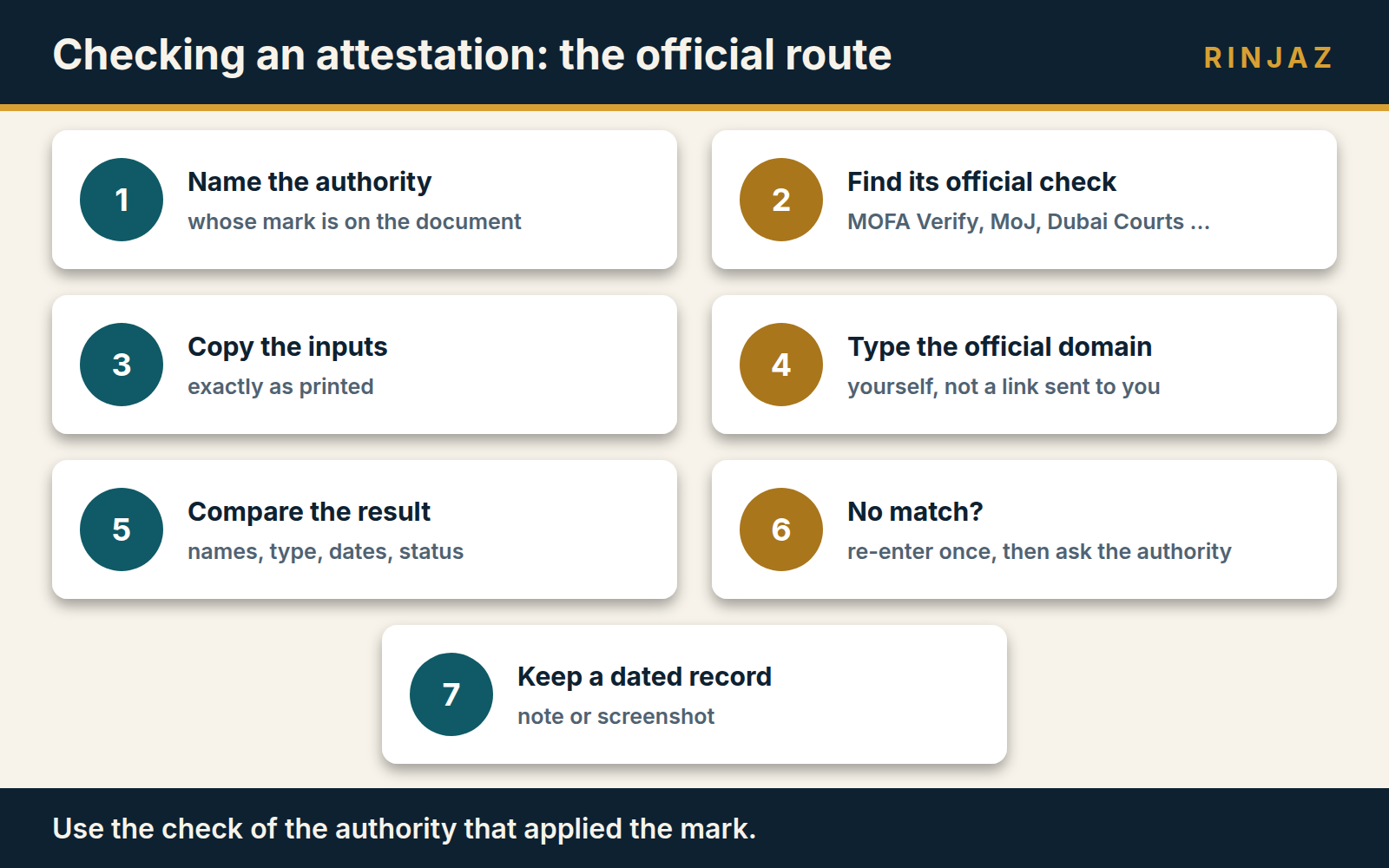
Practical asset: the official verification route protocol. Work through it for each document and keep the record with your file. | Step | What to do | Record | |---|---|---| | 1 | Name the authority whose attestation, notarisation or seal is on the document | Authority: ____ | | 2 | Find that authority's check in the route table above | Channel: ____ | | 3 | Copy the inputs the page asks for, exactly as printed on the document | Number: ____ Date: ____ | | 4 | Run the check on the official domain you typed yourself, not a link sent with the document | Result shown: ____ | | 5 | Compare names, document type, dates and status with the copy you hold | Match: yes / no | | 6 | If there is no match, re-enter the details once, then contact the authority | Reference of your enquiry: ____ | | 7 | Keep a dated note or screenshot of the result | Checked by and date: ____ | Questions to ask before you rely on a result 1. Is this a MoFA digital attestation, an embassy digital attestation, or a paper attestation? Only the first two point to MOFA Verify on the pages reviewed. 2. Is the document a Digital Trusted Document or a UAE PASS signed file? If so, the UAE Verify and UAE PASS routes above also apply; for a MoFA digital attestation, use MOFA Verify. 3. Does the underlying document carry its own QR code, barcode or reference number from the body that issued it? 4. Does the MoJ label number, or the Dubai Courts document number and year, match the result? 5. For a MoFA digital attestation, has the holder shared the "completion email" MoFA's attestation page refers to? 6. If a check returned nothing, have you asked the authority, rather than drawing a conclusion yourself?
What to do when a check does not match
A result that does not match is a reason to ask the authority, not a finding by itself. Re-check the number and the date you entered, then contact the authority that attested or issued the document.
For MoFA, the attestation page lists the toll-free number "80044444" and WhatsApp "97180044444". The MOFA Verify footer shows "Toll free: 800 44444" and "171 TAWASUL". MoFA's FAQ, answering "How can I submit a complaint, inquiry or suggestion?", states: "You can file it through the complaint, inquiry or suggestion page on www.mofa.gov.ae/ar-ae/contact-us or by calling our Contact Centre on 80044444."
MoFA's attestation page lists reasons for rejecting an application, including "The information does not match the document" and "The document is not original or has been altered". It adds: "Rejected applications cannot be amended or reopened."
We did not find a MoFA page telling the public how to report a suspected false attestation on the pages reviewed on 20 September 2026. The u.ae page "Reporting economic crimes", updated 6 May 2026, lists categories including "forgery, embezzlement, abuse of public funds" and "fraud, scams, or cybercrime". Among the channels it names are "contact your local police" and the "Dubai Police eCrime platform". If you believe a document may be false, take advice before acting, and let the authorities decide.
Who decides, what you prepare, what a provider can do
What the authority decides. The authority that attested, notarised or issued the document decides whether its attestation or record is genuine and valid. MoFA decides for its attestations, the MoJ and the courts for their notarised and attested files, and the issuing entity for a Digital Trusted Document checked on UAE Verify.
What the employer, university or professional body prepares. A clear copy of the document, the attestation number, label number or document number as printed, the date, and a record of which official channel you used and what it showed. Where a check needs the holder's input, such as the completion email or UAE PASS access, ask the holder for it.
What a provider can do. A provider, within whatever its licence covers, can help a document holder obtain an attestation through the correct authority channel and pass on the reference details the authority issues. It cannot confirm that a document is genuine; only the authority's own records can. Choosing a provider is covered in the guide to choosing a PRO services company, and the role of clearing firms in the explainer on document clearing services in Dubai.
Last verified: 20 September 2026. Information verified against official sources on 20 September 2026.
If you need a document attested through the correct authority channel, contact RINJAZ to confirm availability, scope and quotation. RINJAZ is a privately licensed UAE service provider. It is not a government entity and does not act for any authority.
A provider's role, within whatever its licensed activity covers, is to prepare documents, submit them through the correct channel and track progress. The authority that attested or issued a document decides whether it is genuine, and no provider can promise the outcome.
Clear answers, without the clutter
Can I check a MoFA attestation online?
Where do I find the attestation number on a MoFA digitally attested document?
Is MOFA Verify the same as UAE Verify?
How do I check a document attested by the Ministry of Justice?
Can a university or employer look up a Dubai Courts notarised document?
What should I do if an attestation check does not match?
Official sources
Primary government and institutional references used to verify this guide. Open any source in a new tab for the current authority wording.
- UAE Ministry of Foreign AffairsOfficial guidance and service information↗
- UAE Ministry of Foreign AffairsOfficial guidance and service information↗
- UAE Ministry of Foreign AffairsOfficial guidance and service information↗
- UAE Ministry of Foreign AffairsOfficial guidance and service information↗
- UAE Ministry of Foreign AffairsOfficial guidance and service information↗
- UAE Ministry of Foreign AffairsOfficial guidance and service information↗
- UAE Ministry of Foreign AffairsOfficial guidance and service information↗
- UAE Ministry of Foreign AffairsOfficial guidance and service information↗
- UAE Ministry of Foreign AffairsOfficial guidance and service information↗
- moj.gov.aepage updated 12 Dec 2024↗
- eattestation.moj.gov.aeOfficial guidance and service information↗
- moj.gov.aepage updated 12 Dec 2024↗
- dc.gov.aepage updated 17 Oct 2025↗
- UAE Government Portalpage updated 30 Dec 2024↗
- dgov.tdra.gov.aeOfficial guidance and service information↗
- UAE Government Portalpage updated 30 Dec 2024↗
- dgov.tdra.gov.aeOfficial guidance and service information↗
- docs.uaepass.aeOfficial guidance and service information↗
- eservices.mohesr.gov.aeOfficial guidance and service information↗
- mohesr.gov.aeOfficial guidance and service information↗
- UAE Government Portalpage updated 24 Mar 2026↗
- Dubai Health AuthorityOfficial guidance and service information↗
- UAE Government Portalpage updated 6 May 2026↗
- adjd.gov.aeOfficial guidance and service information↗